> ## Documentation Index
> Fetch the complete documentation index at: https://gcore-doc-1256a.mintlify.site/llms.txt
> Use this file to discover all available pages before exploring further.
# Application Catalog
The Application Catalog is a curated library of pre-built open-source AI models available in Gcore Everywhere Inference. Models deploy directly without building or configuring a custom container image.
The catalog groups models into the following categories:
| Category | Description |
| ---------------------- | -------------------------------------------------------------------------------------- |
| Text LLM | Large language models for text generation, summarization, and reasoning |
| Text + Image LLM | Multimodal models that accept both text and image inputs |
| Text + Audio LLM | Multimodal models that accept both text and audio inputs |
| Text embedding | Models that convert text into vector representations for semantic search and retrieval |
| Embedding | Multimodal embedding models |
| Image generation | Models that generate images from text prompts |
| Video Super-Resolution | Models that upscale and enhance video quality |
| Speech recognition | Models that transcribe spoken audio to text |
| Text to speech | Models that convert text to spoken audio |
| Safety model | Models that classify content for safety and policy compliance |
## Browse the catalog
1\. In the [Gcore Customer Portal](https://portal.gcore.com/), navigate to **Everywhere Inference** > **Application Catalog**.
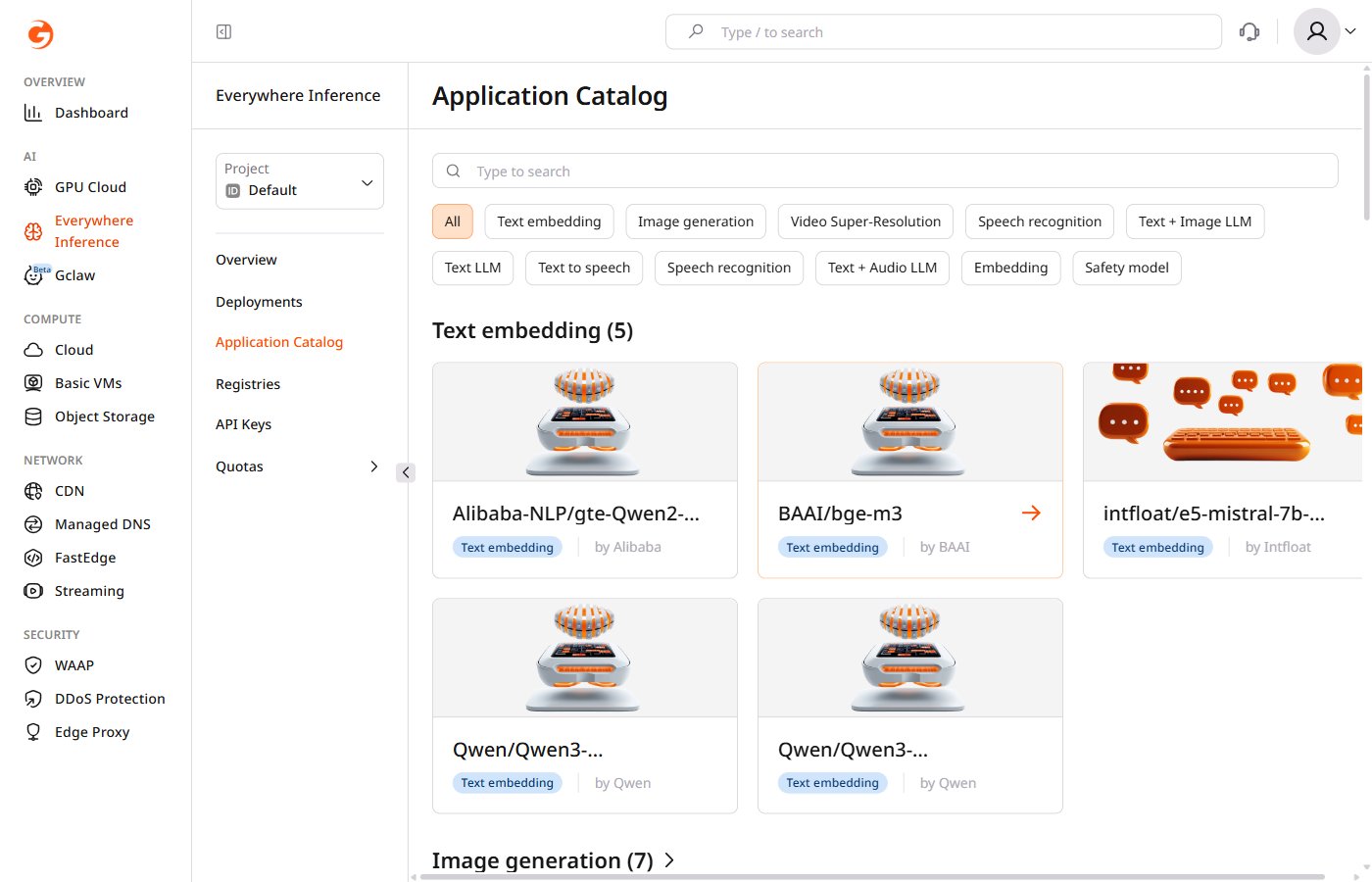 The catalog page shows all available models grouped by category. Each model card displays the model name, category, and provider.
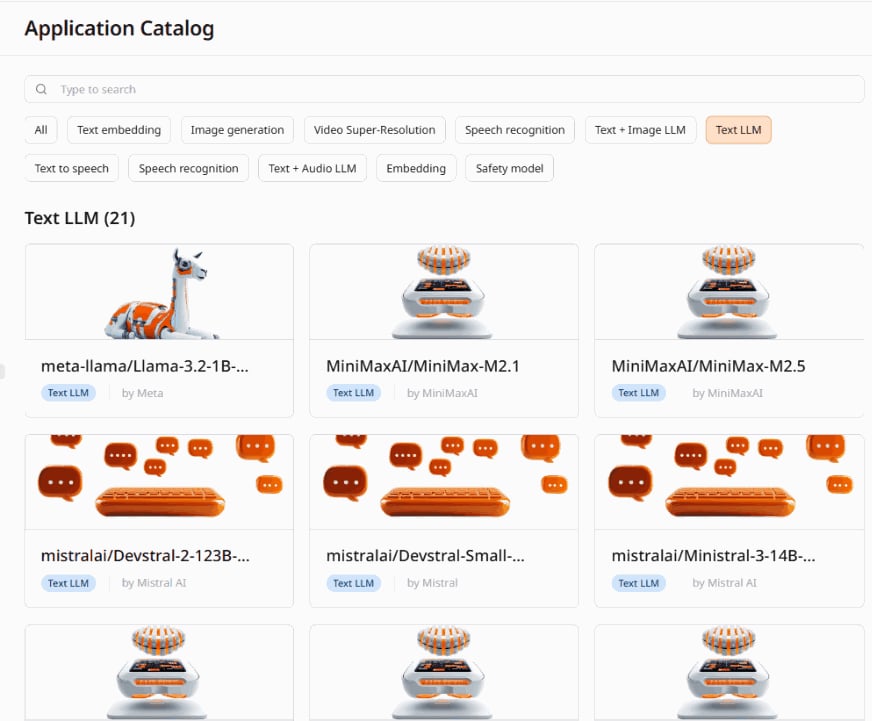
2\. To filter models by category, click the corresponding category button above the model list.
3\. To find a specific model, type its name in the **Type to search** field.
The catalog page shows all available models grouped by category. Each model card displays the model name, category, and provider.
2\. To filter models by category, click the corresponding category button above the model list.
3\. To find a specific model, type its name in the **Type to search** field.
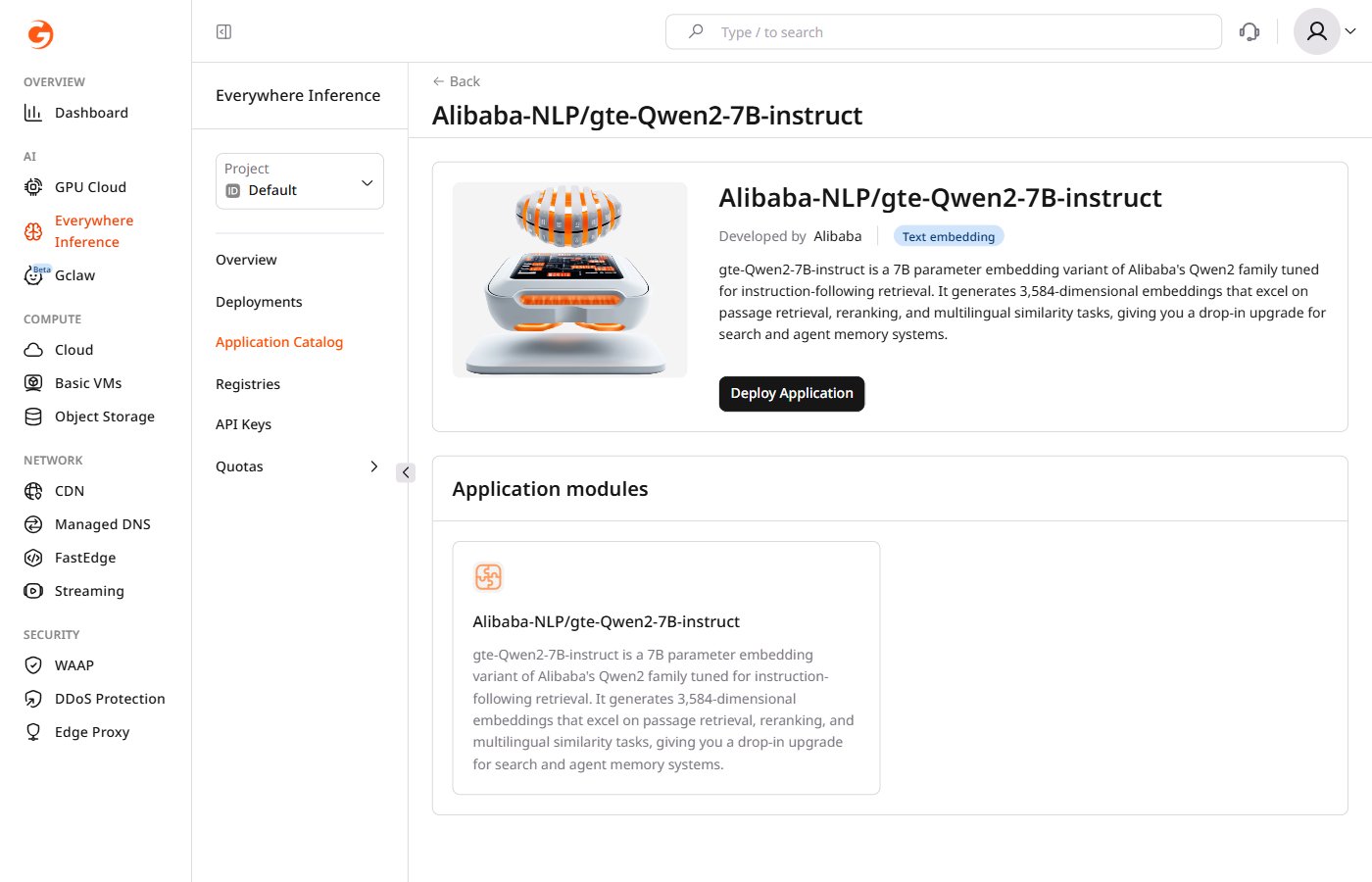
 4\. Click any model card to open its detail page. It shows the model name, provider, category, description, and application modules with license links.
 ## Deploy a model
[Request a quota increase](/edge-ai/everywhere-inference/quotas/request-quota-increase) if the account quota is insufficient for the selected flavor.
1\. Open the model detail page and click **Deploy Application**.
The **Create Deployment** form opens with the selected application pre-filled.
## Deploy a model
[Request a quota increase](/edge-ai/everywhere-inference/quotas/request-quota-increase) if the account quota is insufficient for the selected flavor.
1\. Open the model detail page and click **Deploy Application**.
The **Create Deployment** form opens with the selected application pre-filled.
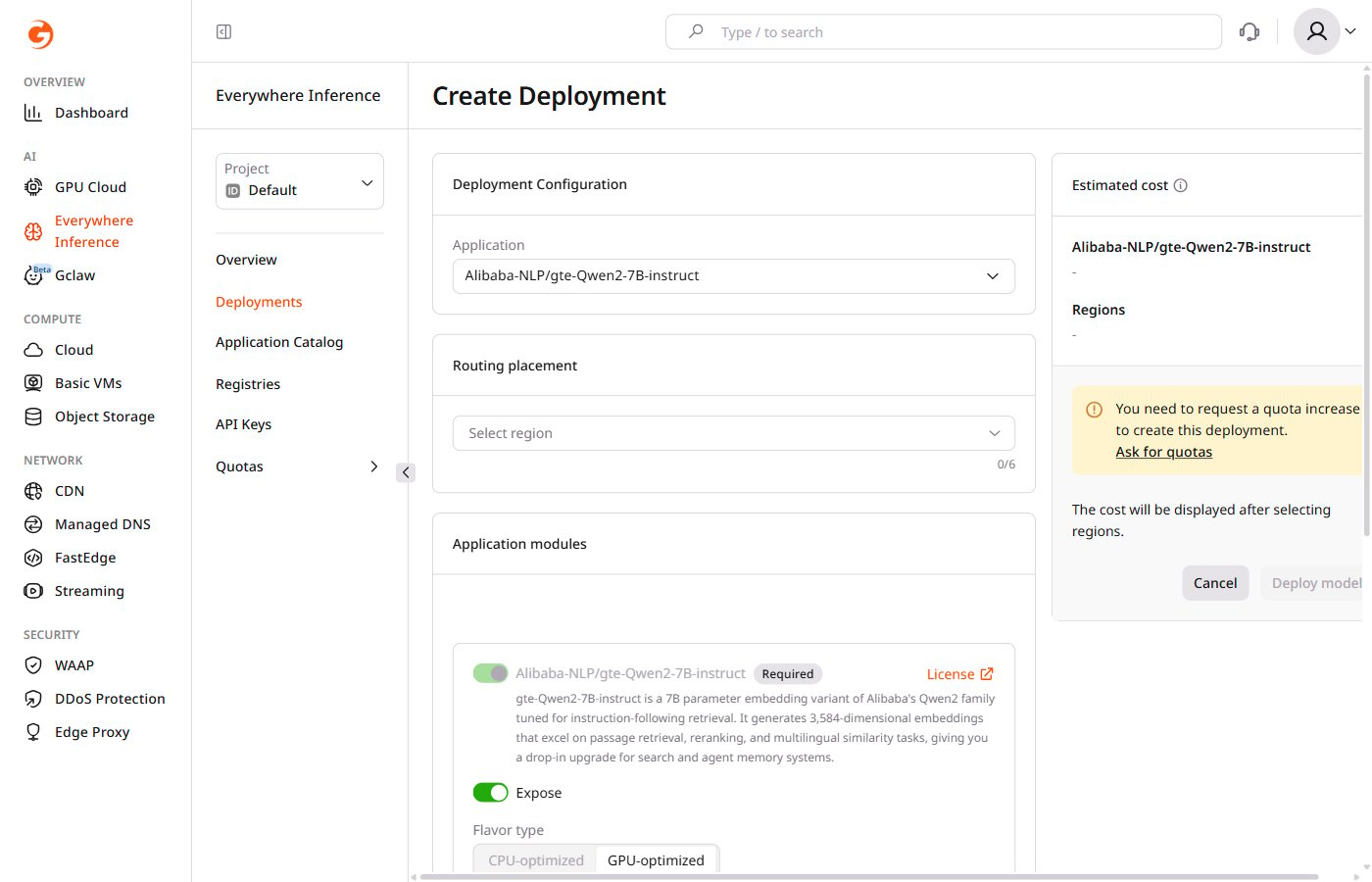 2\. Under **Routing placement**, click **Select region** and select up to six regions where the model will run.
3\. Under **Application modules**, configure the compute resources:
* **Flavor type** — select **CPU-optimized** or **GPU-optimized** depending on the model requirements.
* **Flavor** — select the hardware configuration from the dropdown.
* **Minimum pods** — the minimum number of pods to keep running during low-traffic periods.
* **Maximum pods** — the maximum number of pods Gcore provisions during peak traffic.
2\. Under **Routing placement**, click **Select region** and select up to six regions where the model will run.
3\. Under **Application modules**, configure the compute resources:
* **Flavor type** — select **CPU-optimized** or **GPU-optimized** depending on the model requirements.
* **Flavor** — select the hardware configuration from the dropdown.
* **Minimum pods** — the minimum number of pods to keep running during low-traffic periods.
* **Maximum pods** — the maximum number of pods Gcore provisions during peak traffic.
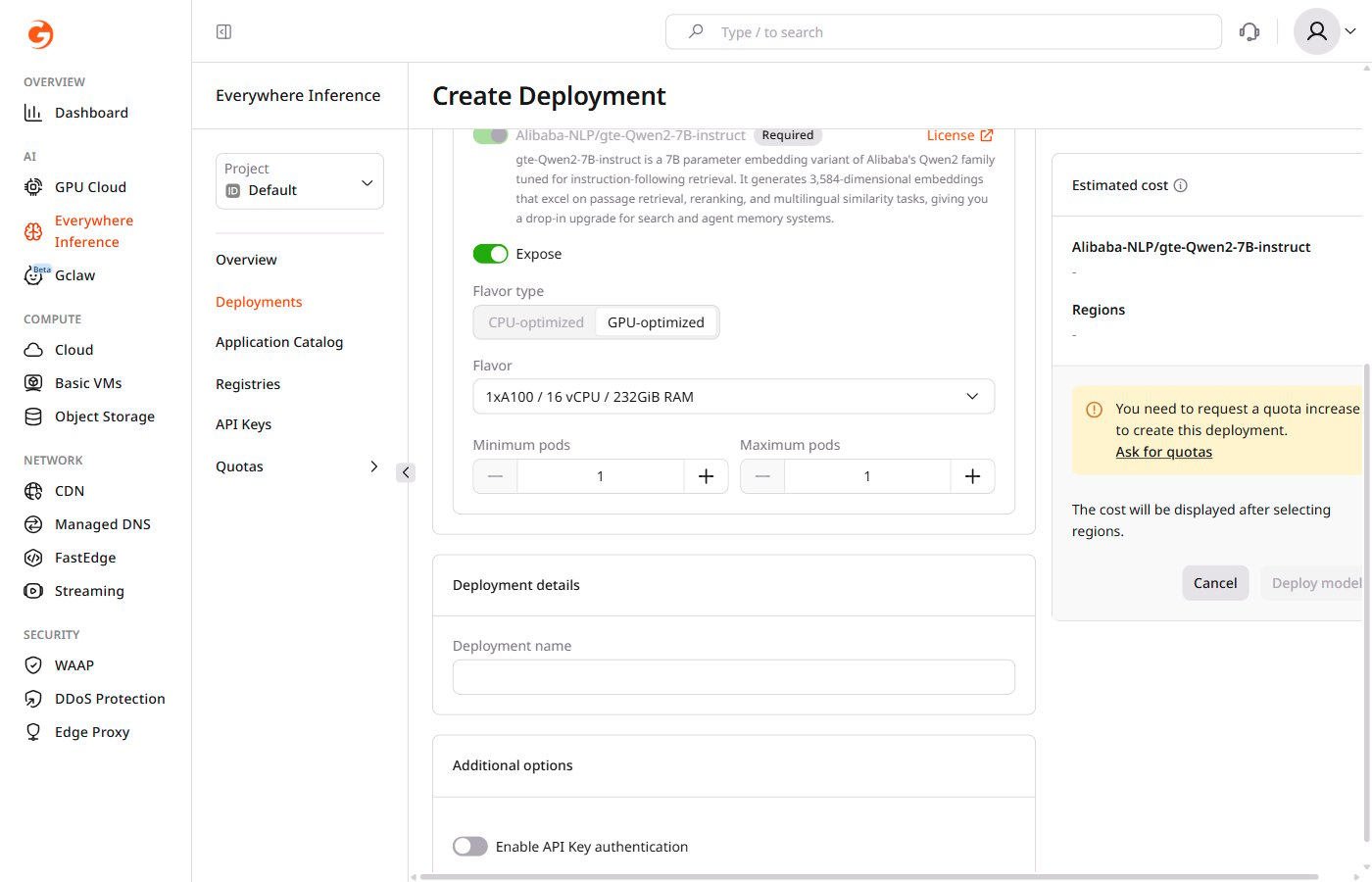 The main application module cannot be removed. The **Expose** toggle controls whether its endpoint is publicly accessible.
4\. Under **Deployment details**, enter a name for the deployment.
5\. (Optional) Under **Additional options**, enable the **Enable API Key authentication** toggle to restrict access to the deployment using [API keys](/edge-ai/everywhere-inference/api-keys/create-inference-deployment-with-auth).
6\. Review the estimated cost in the right panel, then click **Deploy model**.
Gcore creates the deployment and opens the **Deployments** page, where the deployment status is visible.
## Available models
| Model | Provider |
| ---------------------------------------- | ---------- |
| meta-llama/Llama-3.2-1B-Instruct | Meta |
| MiniMaxAI/MiniMax-M2.1 | MiniMaxAI |
| MiniMaxAI/MiniMax-M2.5 | MiniMaxAI |
| mistralai/Devstral-2-123B-Instruct-2512 | Mistral AI |
| mistralai/Devstral-Small-2505 | Mistral |
| mistralai/Ministral-3-14B-Reasoning-2512 | Mistral AI |
| openai/gpt-oss-120b | OpenAI |
| openai/gpt-oss-20b | OpenAI |
| Qwen/Qwen3-14B | Qwen |
| Qwen/Qwen3-235B-A22B-Instruct-2507 | Qwen |
| Qwen/Qwen3-30B-A3B | Qwen |
| Qwen/Qwen3-30B-A3B-Instruct-2507 | Qwen |
| Qwen/Qwen3-30B-A3B-Thinking-2507 | Qwen |
| Qwen/Qwen3-32B | Qwen |
| Qwen/Qwen3-Coder-30B-A3B-Instruct | Qwen |
| Qwen/Qwen3.5-122B-A10B | Qwen |
| Qwen/Qwen3.5-35B-A3B | Qwen |
| Qwen/Qwen3.5-397B-A17B-FP8 | Qwen |
| xai-org/grok-2 | xAI |
| zai-org/GLM-4.7 | Z.ai |
| zai-org/GLM-4.7-Flash | Z.ai |
| Model | Provider |
| -------------------------------- | -------- |
| google/gemma-3-27b-it | Google |
| Qwen/QVQ-72B-Preview | Qwen |
| Qwen/Qwen3-VL-235B-A22B-Instruct | Qwen |
| Model | Provider |
| -------------------------------- | -------- |
| mistralai/Voxtral-Small-24B-2507 | Mistral |
| Model | Provider |
| --------------------------------- | -------- |
| Alibaba-NLP/gte-Qwen2-7B-instruct | Alibaba |
| BAAI/bge-m3 | BAAI |
| intfloat/e5-mistral-7b-instruct | Intfloat |
| Qwen/Qwen3-Embedding-4B | Qwen |
| Qwen/Qwen3-Embedding-8B | Qwen |
| Model | Provider |
| --------------------------------- | -------- |
| nvidia/nemotron-colembed-vl-8b-v2 | NVIDIA |
| vidore/colpali-v1.3 | Vidore |
| Model | Provider |
| -------------------------------- | ----------------- |
| ByteDance/SDXL-Lightning | ByteDance |
| FLUX.1-dev | Black Forest Labs |
| FLUX.1-schnell | Black Forest Labs |
| stable-cascade | Stability AI |
| stable-diffusion-3.5-large | Stability AI |
| stable-diffusion-3.5-large-turbo | Stability AI |
| stable-diffusion-xl | Stability AI |
| Model | Provider |
| --------------------------------------- | ---------- |
| facebook/seamless-m4t-v2-large | Meta |
| mistralai/Voxtral-Mini-4B-Realtime-2602 | Mistral AI |
| openai/whisper-large-v3 | OpenAI |
| openai/whisper-large-v3-turbo | OpenAI |
| Model | Provider |
| ------------------------ | ---------- |
| microsoft/VibeVoice-1.5B | Microsoft |
| microsoft/VibeVoice-7B | Microsoft |
| ResembleAI/chatterbox | ResembleAI |
| Model | Provider |
| ------------------------- | --------- |
| ByteDance-Seed/SeedVR2-7B | ByteDance |
| Model | Provider |
| ----------------------------- | -------- |
| openai/gpt-oss-safeguard-120b | OpenAI |
| openai/gpt-oss-safeguard-20b | OpenAI |
| Qwen/Qwen3Guard-Gen-8B | Qwen |
The main application module cannot be removed. The **Expose** toggle controls whether its endpoint is publicly accessible.
4\. Under **Deployment details**, enter a name for the deployment.
5\. (Optional) Under **Additional options**, enable the **Enable API Key authentication** toggle to restrict access to the deployment using [API keys](/edge-ai/everywhere-inference/api-keys/create-inference-deployment-with-auth).
6\. Review the estimated cost in the right panel, then click **Deploy model**.
Gcore creates the deployment and opens the **Deployments** page, where the deployment status is visible.
## Available models
| Model | Provider |
| ---------------------------------------- | ---------- |
| meta-llama/Llama-3.2-1B-Instruct | Meta |
| MiniMaxAI/MiniMax-M2.1 | MiniMaxAI |
| MiniMaxAI/MiniMax-M2.5 | MiniMaxAI |
| mistralai/Devstral-2-123B-Instruct-2512 | Mistral AI |
| mistralai/Devstral-Small-2505 | Mistral |
| mistralai/Ministral-3-14B-Reasoning-2512 | Mistral AI |
| openai/gpt-oss-120b | OpenAI |
| openai/gpt-oss-20b | OpenAI |
| Qwen/Qwen3-14B | Qwen |
| Qwen/Qwen3-235B-A22B-Instruct-2507 | Qwen |
| Qwen/Qwen3-30B-A3B | Qwen |
| Qwen/Qwen3-30B-A3B-Instruct-2507 | Qwen |
| Qwen/Qwen3-30B-A3B-Thinking-2507 | Qwen |
| Qwen/Qwen3-32B | Qwen |
| Qwen/Qwen3-Coder-30B-A3B-Instruct | Qwen |
| Qwen/Qwen3.5-122B-A10B | Qwen |
| Qwen/Qwen3.5-35B-A3B | Qwen |
| Qwen/Qwen3.5-397B-A17B-FP8 | Qwen |
| xai-org/grok-2 | xAI |
| zai-org/GLM-4.7 | Z.ai |
| zai-org/GLM-4.7-Flash | Z.ai |
| Model | Provider |
| -------------------------------- | -------- |
| google/gemma-3-27b-it | Google |
| Qwen/QVQ-72B-Preview | Qwen |
| Qwen/Qwen3-VL-235B-A22B-Instruct | Qwen |
| Model | Provider |
| -------------------------------- | -------- |
| mistralai/Voxtral-Small-24B-2507 | Mistral |
| Model | Provider |
| --------------------------------- | -------- |
| Alibaba-NLP/gte-Qwen2-7B-instruct | Alibaba |
| BAAI/bge-m3 | BAAI |
| intfloat/e5-mistral-7b-instruct | Intfloat |
| Qwen/Qwen3-Embedding-4B | Qwen |
| Qwen/Qwen3-Embedding-8B | Qwen |
| Model | Provider |
| --------------------------------- | -------- |
| nvidia/nemotron-colembed-vl-8b-v2 | NVIDIA |
| vidore/colpali-v1.3 | Vidore |
| Model | Provider |
| -------------------------------- | ----------------- |
| ByteDance/SDXL-Lightning | ByteDance |
| FLUX.1-dev | Black Forest Labs |
| FLUX.1-schnell | Black Forest Labs |
| stable-cascade | Stability AI |
| stable-diffusion-3.5-large | Stability AI |
| stable-diffusion-3.5-large-turbo | Stability AI |
| stable-diffusion-xl | Stability AI |
| Model | Provider |
| --------------------------------------- | ---------- |
| facebook/seamless-m4t-v2-large | Meta |
| mistralai/Voxtral-Mini-4B-Realtime-2602 | Mistral AI |
| openai/whisper-large-v3 | OpenAI |
| openai/whisper-large-v3-turbo | OpenAI |
| Model | Provider |
| ------------------------ | ---------- |
| microsoft/VibeVoice-1.5B | Microsoft |
| microsoft/VibeVoice-7B | Microsoft |
| ResembleAI/chatterbox | ResembleAI |
| Model | Provider |
| ------------------------- | --------- |
| ByteDance-Seed/SeedVR2-7B | ByteDance |
| Model | Provider |
| ----------------------------- | -------- |
| openai/gpt-oss-safeguard-120b | OpenAI |
| openai/gpt-oss-safeguard-20b | OpenAI |
| Qwen/Qwen3Guard-Gen-8B | Qwen |